
Acona
A macOS piano-roll editor for the NEUTRINO AI singing synthesizer.
Place the notes, drop in the lyrics, and hear them sung. The back-and-forth you used to do before and after synthesis now happens in one app. Besides MusicXML and MIDI, Acona can also import files in eight formats from other singing synthesizers (you can check whether your own files open in Acona for free before you buy).
Buy-once 4,000 yen (tax incl.) / One year 2,000 yen (tax incl.)
Hear it
Listen to the two below one after the other. The first is the voice as synthesised; in the second, only the pitch curve has been redrawn. Whatever you hear differently is what redrawing the curve in Acona gives you.
No accompaniment — voice only. Same notes, same lyrics, same voice; only the pitch curve differs.
What you stop doing
- Assign the lyrics to notes one syllable at a time
- Edit the pitch curve as a file full of numbers
- Re-synthesise, export, and listen in another app after every change
- Find unsingable lyrics and empty notes only after synthesis
- Notice out-of-key notes only when your ear catches them
- Pour the lyrics in and they land syllable by syllable
- Draw the pitch curve directly on screen
- Synthesis and playback in one app. Synthesize just the selected track or range and listen
- See unsingable lyrics and empty notes while you write
- Out-of-key notes are coloured, or locked to the scale
The work does not get smaller. What disappears is the time spent doing the same thing by hand, again. The more songs you make, the wider the gap.
Built to keep
you moving.
Synthesize, listen, fix. Every feature here exists to shorten that loop.

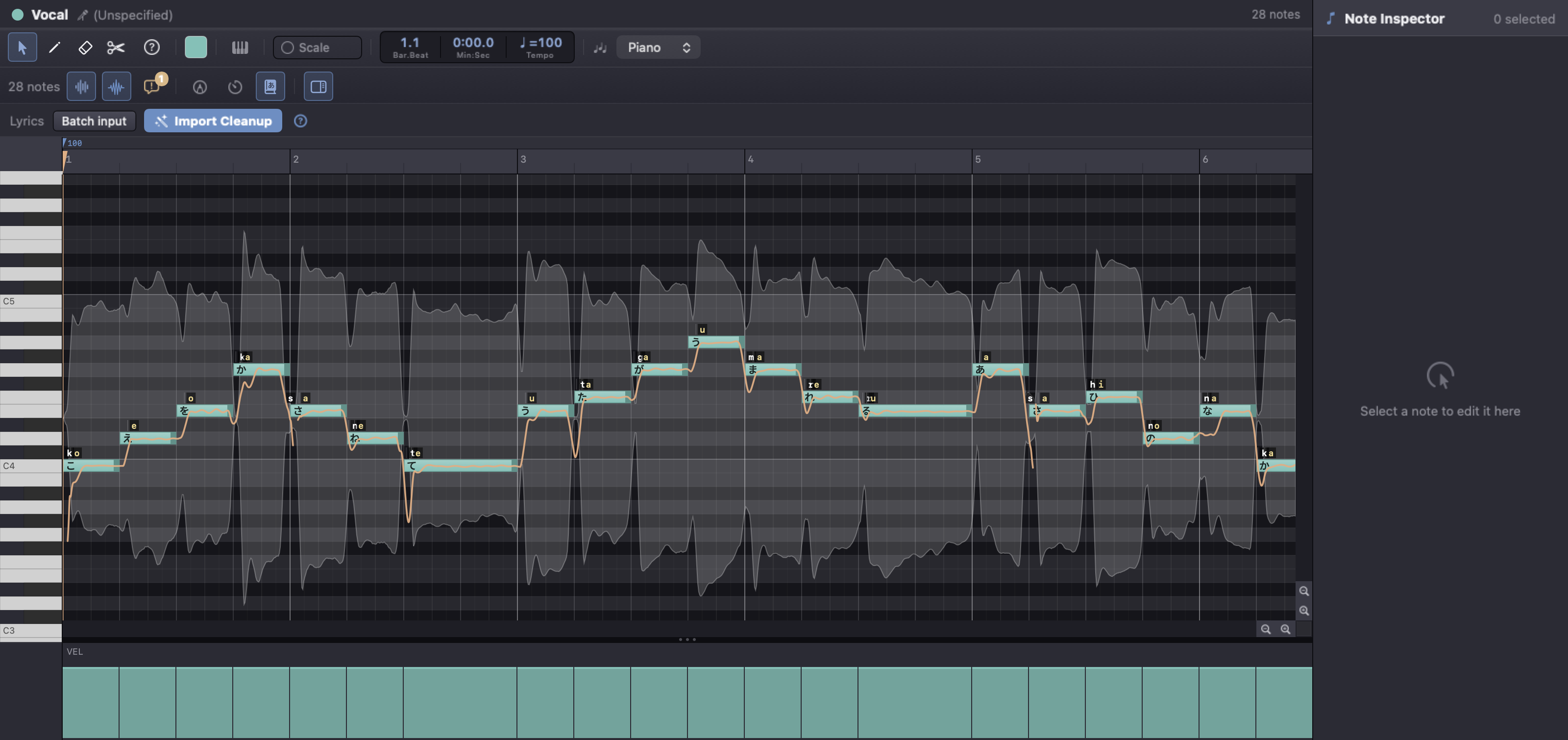
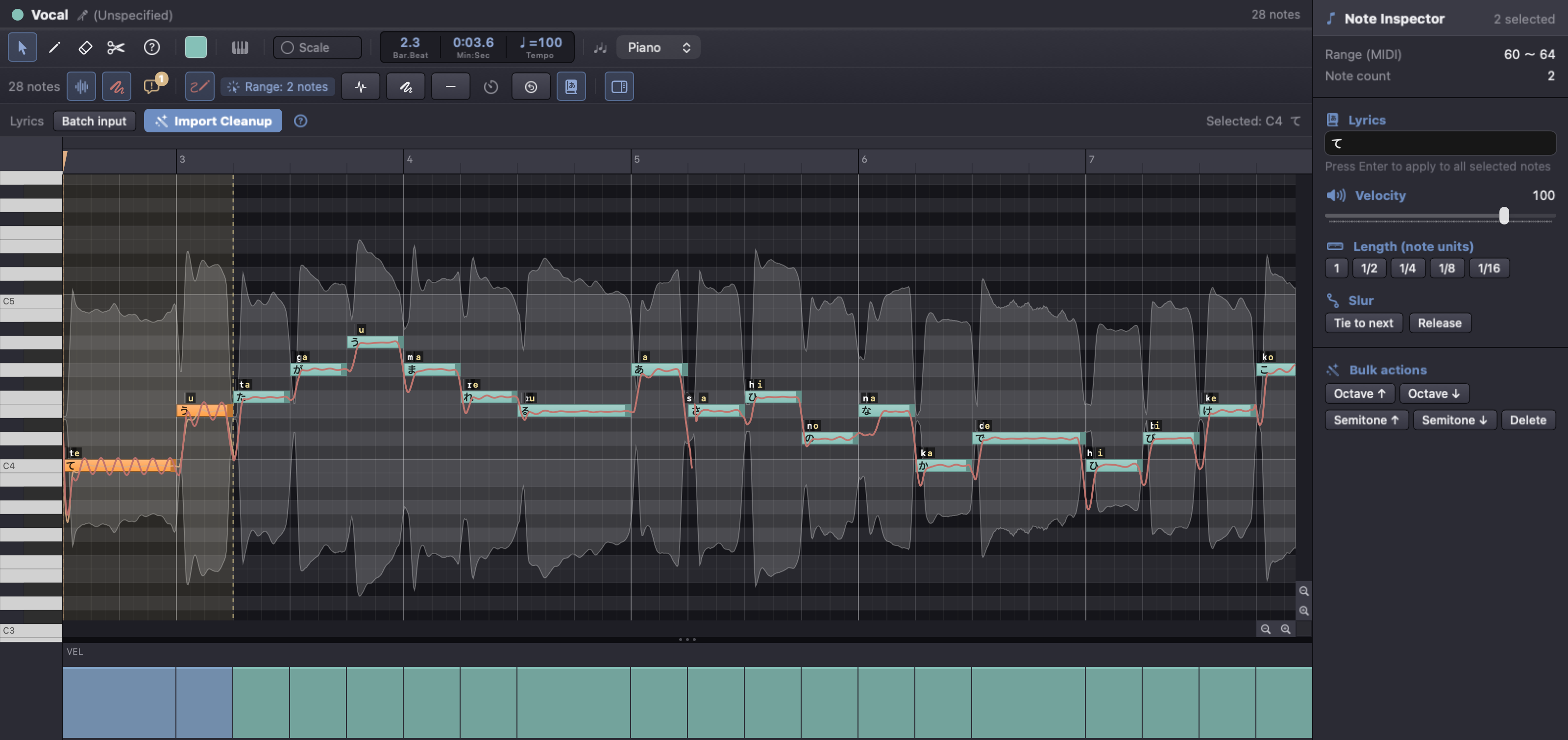
Piano-roll editing
Place a note, type a lyric. Drag, split, transpose and quantize with the same feel as your DAW.
Bulk lyric entry
Paste a whole line and Acona splits it syllable by syllable across your notes, keeping it singable.
f0 (pitch curve) editing
Redraw the synthesized pitch directly on screen — scoops, vibrato or dead-flat lines, exactly as you intend.
Waveform & phoneme view
The rendered waveform and phoneme timing sit right under your notes, so drift between lyric and sound is easy to spot.
Scale assist
Notes outside the key are flagged in colour, or locked to the scale — no more discovering a stray note after synthesis.
Issue detection & batch fix
Unsingable lyrics and empty notes are caught as you work. Where the fix is unambiguous, apply them all after a confirmation.
From import
to final polish.
Files from other singing synthesizers, score files, and songs written from scratch all follow the same path.
Import or write
Import MusicXML, MIDI or files from other singing synthesizers, or start from nothing. After importing, run Auto-Fix Lyrics & Notes to tidy up broken lyrics and similar problems in one go, choosing which fixes to apply.
Add the lyrics
Pour in a line and let it split by syllable, or select a note and type it in directly.
Synthesize
Synthesize with Mix Down, which calls NEUTRINO. Choose all tracks, the selected track only, or just a selected range. To have several tracks sing, choose a voice for each one with “Choose voice” on its track card; each track is then sung in its own voice and the results are mixed together (tracks imported from other software or score files start without a voice).
Polish
Redraw f0 in the piano roll window and check placement against the waveform and phonemes. Once you have edited f0, a “Re-synthesize with f0” button appears in the top bar of the main window; use it to rebuild the voice. Volume, pan, mute and solo can be adjusted in the Mixer window.
Importing, and tidying up afterwards
The formats Acona can import are listed in the Requirements table below.
Acona brings in the notes (pitch and length), lyrics, tempo and time signatures. (Acona doesn't read time signatures from .ust files; it treats them as 4/4.) Singing-expression settings from the original software (pitch curves, vibrato, volume, voice character and so on) and the singer assignment can't be carried over to NEUTRINO, so Acona leaves them out. For files from other singing synthesizers, and for MIDI pitch bend and modulation, Acona shows in Issues how many settings it removed; some things, such as the singer assignment, are left out without notice. Leaving them out doesn't change the pitch, length or lyrics of any note.
Tidying up happens in two stages.
- When a file is imported, Acona fixes some values it can't handle, and some notations NEUTRINO doesn't sing, on the spot — for example, keeping pitch within the range Acona can handle, or removing marks such as 強 and 弱 from the end of lyrics in .ust and .ustx files. Most of these fixes are listed in Issues.
- To tidy up broken lyrics and similar problems in one go, use Auto-Fix Lyrics & Notes. Importing alone doesn't run it: open it with the Auto-Fix Lyrics & Notes button in the lyrics bar of the piano roll window (double-click a track card to open the window), then press Apply. Lyric and note fixes apply to every unmuted track, not only the open one (muted tracks are skipped, even if open); fixes for tempo, time signatures and the like apply to the whole song. There are 21 fixes you can turn on or off, and 20 are on by default. Right after Apply, one Undo (⌘Z) returns the song to how it was before.
Main fixes: kanji and katakana lyrics become hiragana / a note whose lyric is only "ー" takes the vowel of the note before it / a lone small "ゃ", "ゅ" or "ょ" is joined to the note before it / notes that start at exactly the same time (a chord) become a single note (the note with a lyric is kept) / where a note runs into the next one, it is cut where the next note starts. Each fix changes only the places that meet its conditions, and you can check the before and after in the results list.
Acona converts kanji to hiragana using macOS's built-in reading lookup. Each note's lyric is looked up on its own, so the context of the song isn't used and a reading may not be the one you meant.
You can check whether your own files open in Acona, and what gets fixed, for free before you buy (within the free range, Acona synthesizes only the first eight bars of a song; depending on the time signature and tempo, it may end sooner, at 64 quarter-note beats or 60 seconds).
What it costs
Write pieces of up to eight bars, with nothing held back. Depending on the time signature and tempo, it may end sooner, at 64 quarter-note beats or 60 seconds. Synthesis and export both work, with no watermark. There is no time limit.
Use this version with no expiry. Major version upgrades are sold separately.
5,000 yen from 2027-01-12.
An internet connection is required at least once every 7 days to check your license (if the check cannot be completed for 7 consecutive days, singing synthesis is limited to the first eight bars until the check succeeds; depending on the time signature and tempo, it may end sooner, at 64 quarter-note beats or 60 seconds). If we discontinue operation of the license-checking server, we will give notice in advance and take the steps set out in Article 3 of the Acona Terms of Use.
Renew each year to keep using Acona. Renewal is never automatic. Each renewal is a new purchase made at that time. Renewal is charged at the price in effect when you renew.
2,500 yen from 2027-01-12.
An internet connection is required at least once every 7 days to check your license (if the check cannot be completed for 7 consecutive days, singing synthesis is limited to the first eight bars until the check succeeds; depending on the time signature and tempo, it may end sooner, at 64 quarter-note beats or 60 seconds). If we discontinue operation of the license-checking server, we will give notice in advance and take the steps set out in Article 3 of the Acona Terms of Use.
Download the app (the free range uses the same app): https://www.ncat.co.jp/dl/acona/latest
Both paid plans give you the same features, on up to two computers.
Acona does not bundle or redistribute NEUTRINO or any voice library. You will need to obtain NEUTRINO separately from its official site. All rights in NEUTRINO and its voice libraries belong to their developer. We are not affiliated with that developer. NEUTRINO and its voice libraries need disk space of their own, separate from Acona; how much depends on how many libraries you install. All product names on this page belong to their respective owners. We are not affiliated with any of them.
To use the paid features, the app needs to connect to the internet at least once every 7 days to check your license. If the check cannot be completed for 7 consecutive days, synthesis is limited to the first eight bars (you can still open, edit and export your work). Depending on the time signature and tempo, it may end sooner, at 64 quarter-note beats or 60 seconds. Everything returns to normal by itself once you are back online.
If your billing country or region is one where we do not sell (see Article 1.5 of the Acona Terms of Use), we will not send a license key and will refund the full amount you paid, whichever region you choose here.
Review your order
- What you are buying
- Price
- License terms (devices)
- One license key may be used on up to two Macs at the same time
- Conditions of use
- An internet connection is required at least once every 7 days to check your license (if the check cannot be completed for 7 consecutive days, singing synthesis is limited to the first eight bars until the check succeeds; depending on the time signature and tempo, it may end sooner, at 64 quarter-note beats or 60 seconds).
- Payment method
- Credit card (your card statement will show LINK.COM* NCAT ACONA)
- Payment timing
- At the time the purchase is completed
- Delivery
- After payment is completed, we send the license key to the email address you provided
- Returns and cancellation
- You can try the features free of charge before purchase (up to 8 bars; depending on the time signature and tempo, it may end sooner, at 64 quarter-note beats or 60 seconds). For this reason, we cannot accept returns or refunds after the license key has been activated on a device. Only where the key has not yet been activated, we will issue a refund within 14 days of purchase.
Payment details are entered on the next screen
By purchasing, you agree that our Terms of Use and Acona Terms of Use apply.
Payment is handled by Stripe. Before you buy, please read our Notation based on the Act on Specified Commercial Transactions.
Requirements
| Platform | macOS 14 (Sonoma) or later / Apple Silicon & Intel |
|---|---|
| Languages | Japanese / English / Simplified Chinese / Korean |
| Import & export | Import .musicxml / .svp (Synthesizer V Studio) / .ppsf (Piapro Studio) / .mid / .ust (UTAU) / .ustx (OpenUtau) / .vsqx (VOCALOID) / .vpr (VOCALOID5, 6) / .ccs (CeVIO) / .tssln (VoiSona)You can check whether your own files open in Acona for free before you buy.Export WAV / MusicXML |
| Synthesis engine | NEUTRINO (official site — obtained separately) |
| Developed by | Studio Lumilune — NCAT LLC |
Acona reads only the first tempo from .ppsf; tempo changes that occur partway through a song are not read.

Important notices from us, such as changes to our terms, are posted in the News section of our home page.